


PILOTLOG - CrewLounge AERO
3.932.00 Reviews
App Specs
- Version
- 6.1
- Updated On
- License
- Free
- Downloads
- 10,000+
- Developer
- Aviovision
- Categories
- Travel & Local
- Platform
- Android
Screenshots
 Analysis by AppCompare
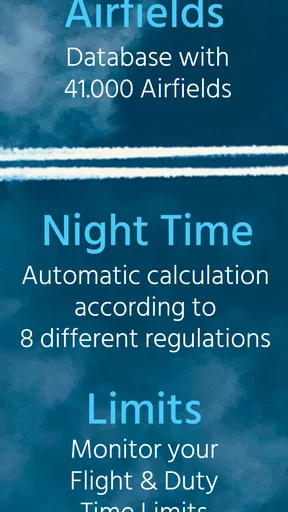
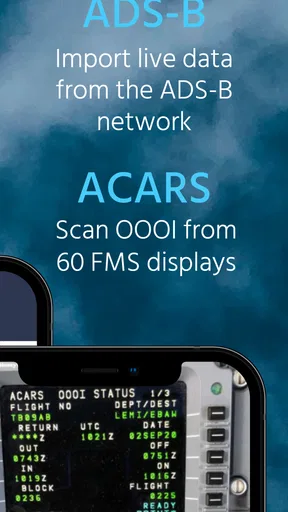
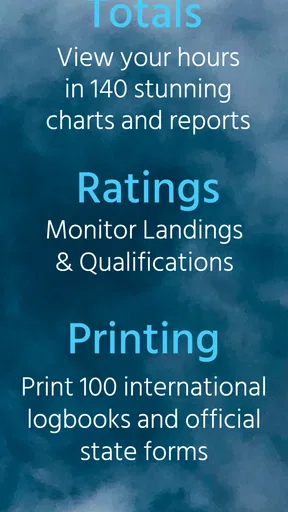
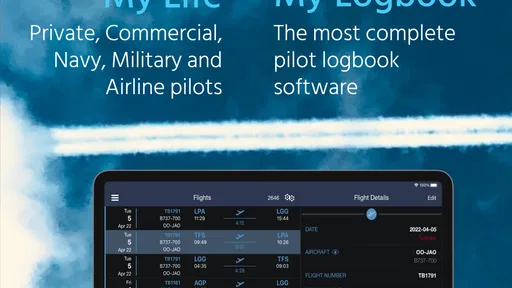
For anyone who treats flight records as more than a quick note after landing, PILOTLOG - CrewLounge AERO is an interesting travel and local app to consider. I approached it as a working pilot logbook rather than a casual aviation companion, and that distinction matters. Its purpose is to give pilots a focused place to organize flight information, review their history, and keep the practical side of record-keeping close to hand.
The app is free to install, carries an Everyone age rating, and is made by Aviovision. It has passed the point where it feels like an experimental niche tool: the current release is version 6.1, and the app has more than ten thousand installs. Its average sits at 3.9 from roughly six hundred ratings, which suggests a useful but not universally effortless experience. I can understand that middle ground. A pilot logbook needs accuracy, consistency, and a workflow that survives busy days, and those expectations are much higher than they are for an ordinary travel app.
How the logbook feels when connectivity is part of the flight day
The most important thing to understand is that this is not an app I would choose simply because I want something aviation-themed on my phone. It is aimed at people who need a structured record of flying activity. That makes its value appear in small moments: preparing an entry before a flight, checking previous details while moving between airports, or reviewing a sequence of flights when a paper notebook would be inconvenient.
Connectivity shapes those moments even when the app itself is being used as a local tool. A pilot may open it in a terminal, on a crew bus, beside an aircraft, or immediately after landing. Those are places where a stable connection cannot be taken for granted. I would therefore treat the app as something to test in the exact environments where I plan to use it, rather than assuming every part of the experience will behave identically online and away from a network.
That is especially relevant before committing to it as a primary record. I would spend time entering representative flights, moving through the screens, and checking how comfortable the process feels when the phone has a weak connection. The app’s store summary presents it as a powerful electronic pilot logbook, but power is only useful if the workflow remains dependable during the unglamorous parts of a flying day.
For a pilot who mostly enters information at home with reliable internet, connectivity may be a minor concern. For someone who records details directly after each sector, it becomes part of the decision. The right question is not simply whether the app looks polished, but whether it fits the rhythm of real operations: short breaks, limited attention, changing locations, and the need to avoid postponing records until memory has filled in the gaps.
Why the phone setting changes the workflow
A mobile logbook has a clear advantage over a traditional notebook: it is normally already with me. I do not need to carry a separate ledger or search through old pages to find a previous entry. That convenience becomes more valuable as the number of flights grows, because digital records can be inspected without physically turning through a long history.
Worth Reading Before You Choose

Baby Panda World Brings Quick Play to Modern Phones, but Its Game Library Feels Busy

ESPN’s Live Game View Makes Following Close Games Easier

QuizzLand Review: A Good Fit for Short Trivia Breaks, Not Every Player

Basketball Stars: Multiplayer Is Fast, but Can It Recover When Matches Go Wrong?

WEBTOON Turns Phone Updates Into a Better Reading Routine

Link to Windows Runs on Shared Habits, Not Social Feeds
There is also a behavioral advantage. When a logbook is available on the same device I use throughout the day, I am more likely to make a record while the details are still fresh. That does not mean the process is automatically quick. Aviation records contain information that deserves careful checking, and a small screen can make a detailed form feel more demanding than a paper page or a desktop keyboard.
I found the strongest use case to be a pilot who wants one dedicated mobile workspace instead of scattering flight notes across a notes app, spreadsheets, and paper. The dedicated format encourages a consistent habit. It also makes the app feel more serious than a generic checklist or travel diary, because the whole experience is centered on pilot records rather than general trip memories.
My practical advice is to create a repeatable entry routine. I would decide which information I record immediately, which details I verify later, and when I review the completed entry. This matters more than it sounds. A logbook can contain many records and still be unreliable if entries are rushed, duplicated, or left half-finished. The app can provide structure, but the pilot still has to build the discipline around it.
Using it between airports and after landing
One realistic scenario is a pilot arriving at an airport after a demanding day. There may be little time to sit down, the phone battery may be lower than expected, and the network may be congested or unavailable. In that situation, the best mobile logbook is not necessarily the one with the longest feature list; it is the one that lets the pilot maintain a clean routine without adding unnecessary friction.
I would use PILOTLOG in stages rather than trying to reconstruct an entire day from memory. Before departure, I would prepare whatever information is practical. After landing, I would complete the flight while the aircraft, route, and timing are still easy to recall. Later, in a calmer setting, I would review the record for mistakes. This staged approach reduces the temptation to enter everything in one rushed session.
Connectivity can interrupt that routine in subtle ways. A screen may load more slowly, a transition may behave differently, or I may hesitate to save an entry if I am unsure whether the app has completed an operation. I would not want to discover those details after a long multi-sector day. A short trial with ordinary entries is more useful than a quick glance at the interface.
The app is also better suited to users who are comfortable checking their own records. It is not a replacement for careful verification. If a particular flight entry matters for personal documentation, currency tracking, or another formal purpose, I would compare it with the original operational information rather than trusting any digital logbook blindly. The benefit is organized access, not freedom from responsibility.
What happens when the connection is unreliable
This is where I would be most cautious. I cannot recommend assuming that every function is available in every offline situation. The app’s role makes network behavior important, but a store description is not a substitute for testing the exact actions I need. I would check how it behaves when opening previous records, starting a new entry, saving changes, and returning to information after the connection has changed.
A sensible test is simple: use the app normally, then repeat the same basic workflow with inconsistent connectivity. I would watch for signs that an action is still processing, whether a completed entry remains visible after reopening, and whether the interface makes the result clear. Those observations tell me more than a general claim about being mobile-friendly.
Recovery is just as important as initial use. If an entry is interrupted, I want to know whether I can confidently continue without creating a duplicate or losing track of what was already recorded. I would avoid tapping repeatedly when a screen seems slow, and I would keep a temporary note of essential details until I have confirmed that the digital record is complete. That is not a criticism unique to this app; it is good practice whenever a record matters.
For a professional workflow, I would also establish a review point at the end of the day. I would open the recent records, check that the expected flights appear, and look for anything that seems incomplete. This takes a little extra time, but it turns connectivity uncertainty into a manageable process. The app becomes one part of a record-keeping habit instead of the only safety net.
Keeping mobile data use under control
Pilots who travel across regions may care about data consumption, roaming, and battery life. I would not leave any travel app running casually when I am abroad or moving through areas with expensive mobile data. Instead, I would use a trusted connection for setup and review when possible, and I would avoid unnecessary repeated loading while moving between locations.
That approach is particularly sensible for a logbook because most of the value comes from accurate records, not from constantly refreshing content. I would make entries deliberately, close the app when finished, and review the result at a convenient time. If the app presents any connection-dependent action, I would reserve it for a moment when the network is stable rather than trying to force it during a rushed turnaround.
Battery awareness matters too. A phone used for navigation, communication, authentication, and operational information already has a demanding workload. A logbook should not be treated as the device’s only responsibility. I would keep the app workflow short during flight-day use and do longer historical reviews when the phone is charged and I have enough attention to spot errors.
This is one area where a paper notebook still has a practical advantage: it does not care about signal, battery, or roaming. A spreadsheet on a laptop may also be more comfortable for extensive editing. PILOTLOG earns its place when the convenience of a dedicated mobile record outweighs those concerns. For me, that means using it as the central digital logbook while maintaining a sensible recovery habit, not pretending that connectivity issues cannot happen.
Who will get the most from this app?
I think the strongest audience is a pilot who wants a purpose-built electronic logbook and is willing to learn its workflow. The app is particularly appealing when flight records need to be kept together over time and accessed from a phone rather than a paper book. It should also suit someone who prefers a specialized aviation tool to building a personal system from generic notes or spreadsheet templates.
A new pilot may appreciate having a dedicated place to develop good recording habits, but I would not choose any logbook solely because it is available for free. The important test is whether the fields, navigation, and review process match the person’s training and flying routine. A beginner who feels overwhelmed by detailed digital forms may find a simpler method easier at first, even if it offers less structure later.
On the other hand, a pilot who already relies on a desktop-centered system may not gain enough from switching. If editing large histories, comparing records, or working with a keyboard is the priority, a computer-based alternative can be more comfortable. The phone format is the reason to choose this app, not something to overlook.
The in-app purchase range, from about seventy-five to eighty-five dollars per item, is another reason to examine the workflow carefully before spending money. The initial download is free, so I would use that opportunity to decide whether the app’s organization and connectivity behavior suit me. A paid expansion can make sense when it supports a real long-term need, but it is harder to justify if I only want a basic place to jot down occasional flight details.
Where it sits beside ordinary alternatives
Compared with a paper logbook, the app offers the appeal of searchable digital history and immediate access on a device I already carry. Paper remains wonderfully predictable, though, especially in a weak-signal environment. It is also easy to annotate freely. The trade-off is that paper becomes less convenient to carry, review, and maintain as the record grows.
Compared with a spreadsheet, a dedicated pilot logbook should feel more natural for aviation-specific record keeping. A spreadsheet can be customized extensively and may be excellent for users who enjoy designing their own system. Its weakness is that the pilot has to create and maintain that structure. PILOTLOG is the more sensible starting point for someone who wants the logbook framework without building it from scratch.
Compared with a generic notes app, this app is the more disciplined choice. Notes are fast, but they can become inconsistent: one entry may use abbreviations, another may omit important context, and later searching can be frustrating. A specialized logbook encourages repeatable records. The price of that structure is less freedom to treat every flight as an informal note.
Connectivity changes the comparison. Paper is independent of networks, while a generic notes app may feel familiar in poor conditions. A specialized digital logbook has to justify any extra dependence through better organization and a more useful long-term record. That is why I would judge this app by complete workflows, not by the first screen or the promise of being powerful.
Small habits that make the experience safer and cleaner
My first tip is to avoid waiting until the end of a long flying day. Record the essential details as soon as the situation allows, then perform a second pass later. This reduces memory-based corrections and makes it easier to identify which entry belongs to which sector.
My second tip is to test the app with an intentionally ordinary scenario before relying on it. Use a typical flight record, close and reopen the relevant screens, and repeat the process in a place where the connection is less reliable. The goal is not to stress the app theatrically; it is to learn whether the workflow matches the places where I actually fly.
My third tip is to separate data entry from data auditing. When I am tired, I should enter what I know and avoid making complex corrections casually. During a later review, I can compare the record with my source information and fix inconsistencies with more attention. This simple separation helps prevent a rushed entry from becoming a permanent mistake.
My fourth tip is to keep a temporary fallback for important details until the digital record has been checked. That might mean retaining the operational information I already use rather than creating a second permanent logbook. The point is continuity during a failed save, weak connection, or distracted moment, not duplicating every record forever.
My final view on PILOTLOG
I see PILOTLOG - CrewLounge AERO as a focused electronic pilot logbook for people who want their flying history organized on a mobile device. Its free entry point makes it reasonable to try, and its specialized purpose gives it a clearer identity than a notes app or a homemade spreadsheet. The rating of 3.9 from around six hundred users reflects the fact that a serious utility can be valuable while still demanding patience and a suitable workflow.
I would recommend it to a pilot who records flights regularly, prefers a dedicated aviation tool, and is prepared to test how network changes affect everyday use. I would be more hesitant for someone who needs a guaranteed paper-like experience in remote locations, dislikes structured forms, or only wants an occasional informal note. In those cases, paper or a simpler offline-first method may be a better fit.
The most honest verdict is that connectivity should be treated as a practical part of the evaluation, not an afterthought. I would install the free version, run a realistic entry-and-review routine, test it in the places I actually travel, and only then decide whether the paid options are worthwhile. Its real strength is not merely putting a logbook on a phone; it is helping a pilot build a repeatable digital record without forgetting that networks, batteries, and human attention can all fail.
Pros
- Comprehensive flight records help track hours
- routes
- aircraft
- and duty history.
- Syncs data across devices
- making records accessible during trips and roster changes.
- Useful crew-focused tools support logbook management beyond basic flight tracking.
- Search and filtering make it easier to find specific flights or past assignments.
- Can reduce paperwork when maintaining personal records for professional flying.
Cons
- Many useful features may require a paid subscription or additional in-app purchases.
- The interface can feel dense for new users unfamiliar with aviation logbook software.
- Accurate records still depend on entering and checking flight details manually.
- Some functions may rely on an internet connection or account synchronization.
- Advanced options can be unnecessary for casual pilots with simple logging needs.
FAQs for PILOTLOG - CrewLounge AERO
What is PILOTLOG - CrewLounge AERO used for?
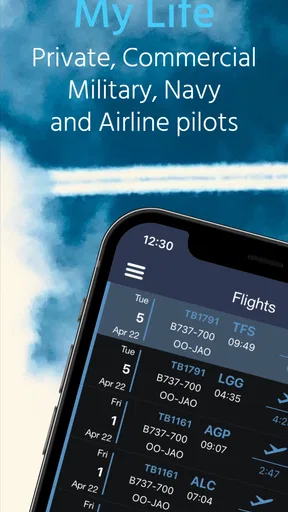
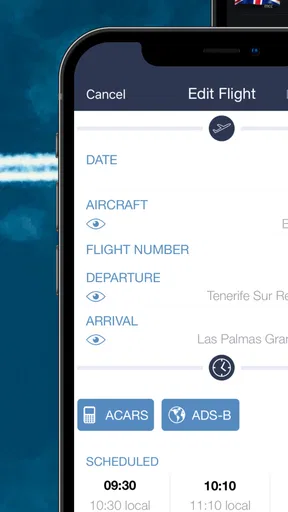
PILOTLOG - CrewLounge AERO is a digital flight-logbook app designed for pilots and flight crew. It helps you record flight details, track hours, manage aircraft and routes, organize duty information, and review your personal aviation history. It can be useful for airline, commercial, private, and student pilots who want a structured alternative to maintaining a paper logbook.
Can I use PILOTLOG - CrewLounge AERO without an internet connection?
The app is intended to support practical flight logging, including situations where you may not have reliable internet access. You can generally enter or review information on your device and synchronize data when a connection becomes available, depending on the feature and account configuration. It is still wise to check that your data has synchronized correctly before relying on it as your only record.
Does PILOTLOG - CrewLounge AERO synchronize data across devices?
PILOTLOG - CrewLounge AERO is built around keeping your logbook available and consistent across supported devices and services. Synchronization can be helpful when moving between a phone, tablet, or web-based account, but it normally requires signing in with the same account and having an internet connection at some point. Always verify recent entries after synchronization, especially before an audit or application.
Is PILOTLOG - CrewLounge AERO suitable for professional pilots and official records?
The app offers features aimed at detailed pilot record keeping, making it suitable for many professional and recreational users. However, whether it meets a specific airline, authority, school, or employer requirement depends on the applicable regulations and acceptance policies. Before replacing a paper or officially approved logbook, confirm that your organization accepts electronic records and learn how exports, signatures, backups, and corrections must be handled.
Is PILOTLOG - CrewLounge AERO free to download and use?
The availability of features may depend on the version of the app, subscription plan, account type, or optional services offered by the developer. You should review the current Google Play Store or Apple App Store listing for pricing, in-app purchases, trial conditions, and included functions before downloading. Also check whether advanced synchronization, reporting, crew tools, or integrations require a paid plan.


